こんにちは、臼田です。
みなさん、DLPしてますか?(挨拶
前回、下記ブログにてMicrosoft PurviewのDLPでマイナンバーを扱うファイルに関する操作を追跡してSplunkに取り込みました。
Microsoft PurviewエンドポイントDLPでマイナンバーの操作を追跡しSplunkでログを確認してみた – CloudNative Inc. BLOGs
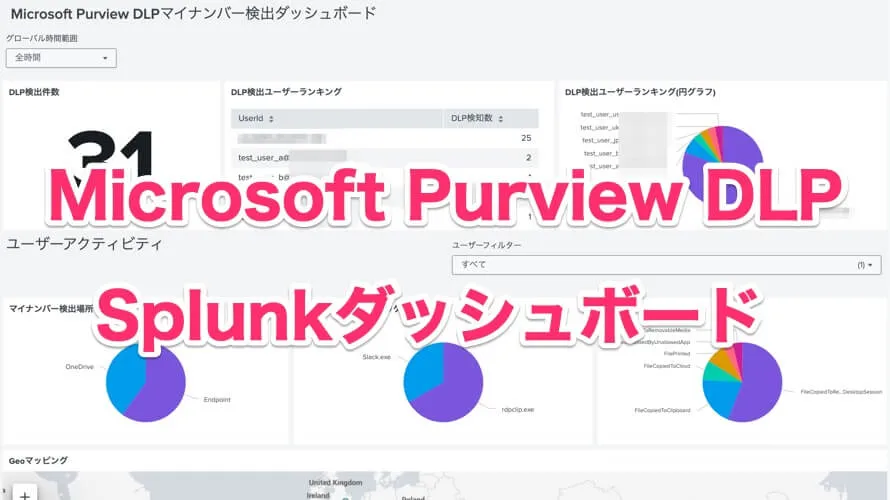
今回はこのデータをダッシュボードにして確認しやすくしてみました。以下のような感じです。どーん!
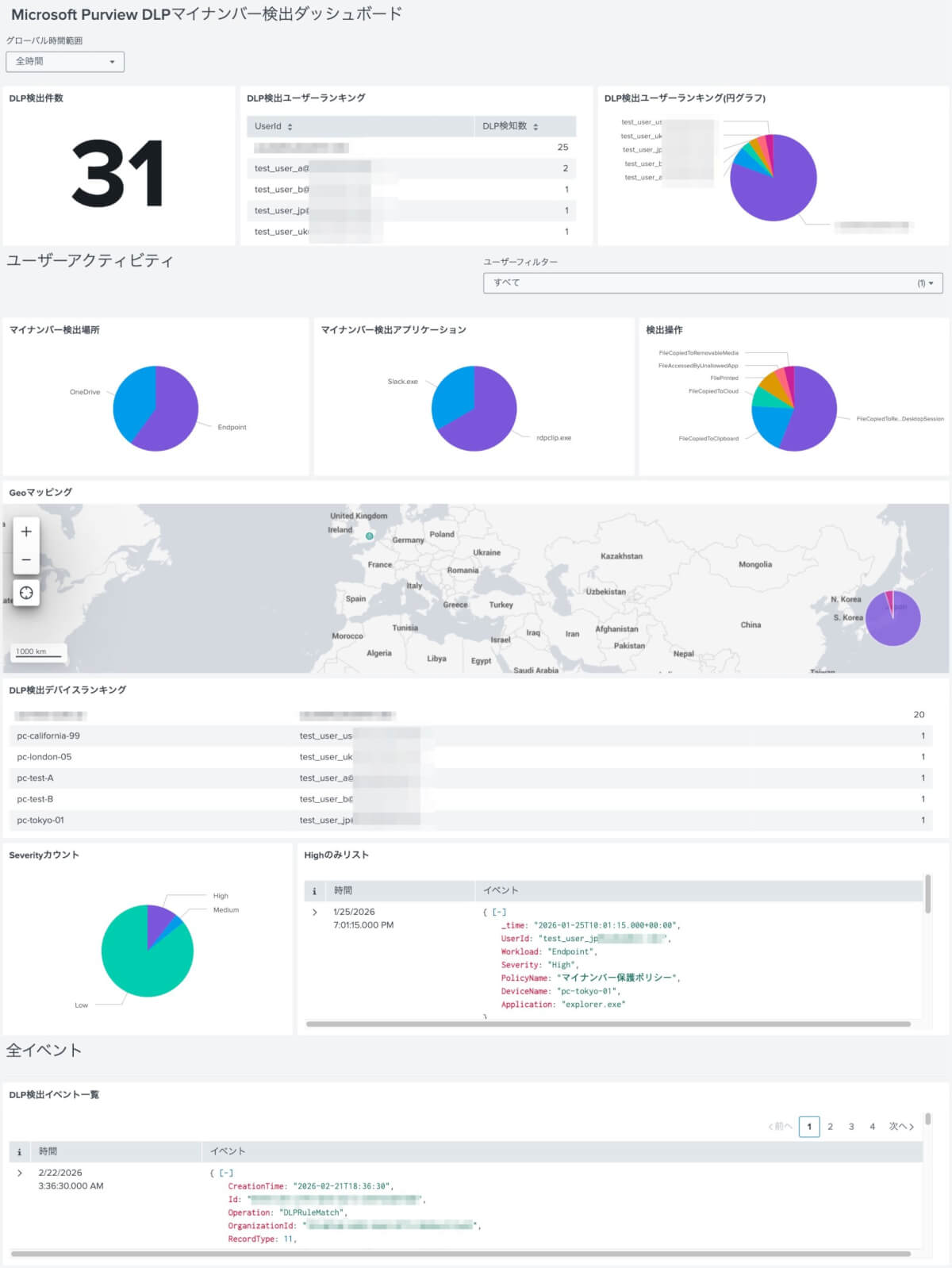
いい感じじゃないですか?というわけでこのダッシュボードを配布します。合わせて詳細な説明もしていきます。
概要
前回の記事ではMicrosoft PurviewのDLPを利用して検出したログをSplunkに取り込む手法を解説しました。特にマイナンバーに関するポリシーで検出させ、どのようなデータが見れるかを確認しました。
今回はこれを使ってマイナンバーがどのように扱われているのかをトラッキングする目的でダッシュボードを作ってみました。DLPのルール自体、違反を見つけてブロックするというより、ユーザーやファイルの状態を追うことが目的のため検出のみになっています。そのため、ダッシュボードでも全体を見て気になったユーザーがいたら深堀りできる感じを目指しています。
ダッシュボード内では大きくDLP全体のアクティビティ全体を見る部分と、ユーザーアクティビティについて見る部分の2つの構成になっています。
ダッシュボードのデータ
こちらです。
ダッシュボードのjson
{
"dataSources": {
"ds_T9xvFZcF": {
"type": "ds.search",
"options": {
"query": "index=\"*\" sourcetype=\"o365:management:activity\" (Operation=\"DLPRuleMatch\" OR Operation=\"DlpRuleMatch\") earliest=\"$global_time.earliest$\" latest=\"$global_time.latest$\"\n| spath path=\"EndpointMetaData.EndpointOperation\" output=EndpointOperation\n| search EndpointOperation=\"*\"\n| search UserId IN ($filter_user_id$)\n| stats count by EndpointOperation\n| sort - count",
"queryParameters": {
"earliest": "0",
"sampleRatio": 1
}
},
"name": "____ search"
},
"ds_L9rAIPB6": {
"type": "ds.search",
"options": {
"query": "index=\"*\" sourcetype=\"o365:management:activity\" Operation=\"DLPRuleMatch\" earliest=\"$global_time.earliest$\" latest=\"$global_time.latest$\"\n| eval UserId = lower(UserId)\n| search UserId IN ($filter_user_id$)\n| iplocation ClientIP\n| geostats count by ClientIP",
"queryParameters": {
"earliest": "0",
"sampleRatio": 1
}
},
"name": "Geo_____ search"
},
"ds_vvAJbxI0": {
"type": "ds.search",
"options": {
"query": "index=\"*\" sourcetype=\"o365:management:activity\" Operation=\"DLPRuleMatch\" earliest=\"$global_time.earliest$\" latest=\"$global_time.latest$\"\n| eval UserId = lower(UserId)\n| search UserId IN ($filter_user_id$)\n| spath path=\"PolicyDetails{}.Rules{}.Severity\" output=Severity\n| search Severity=\"High\"\n| spath path=\"PolicyDetails{}.PolicyName\" output=PolicyName\n| spath path=\"EndpointMetaData.DeviceName\" output=DeviceName\n| spath path=\"EndpointMetaData.Application\" output=Application\n| table _time, UserId, Workload, Severity, PolicyName, DeviceName, Application\n| sort - _time",
"queryParameters": {
"earliest": "0",
"sampleRatio": 1
}
},
"name": "High 1 search"
},
"ds_A9ySclsx": {
"type": "ds.chain",
"options": {
"query": "| fieldsummary maxvals=10",
"extend": "ds_vvAJbxI0"
},
"name": "High 2 search"
},
"ds_IHDgg7N5": {
"type": "ds.search",
"options": {
"query": "index=\"*\" sourcetype=\"o365:management:activity\" Operation=\"DLPRuleMatch\"earliest=\"$global_time.earliest$\" latest=\"$global_time.latest$\"\n| eval UserId = lower(UserId)\n| search UserId IN ($filter_user_id$)\n| spath path=\"PolicyDetails{}.Rules{}.Severity\" output=Severity\n| mvexpand Severity\n| where isnotnull(Severity) AND len(Severity) > 0\n| stats count by Severity\n| eval sort_order = case(Severity=\"High\", 1, Severity=\"Medium\", 2, Severity=\"Low\", 3, true(), 4)\n| sort sort_order\n| fields - sort_order",
"queryParameters": {
"earliest": "0",
"sampleRatio": 1
}
},
"name": "Pie chart search2"
},
"ds_5Cr2qV1N": {
"type": "ds.search",
"options": {
"query": "index=\"*\" sourcetype=\"o365:management:activity\" Operation=\"DLPRuleMatch\"\n| eval UserId = lower(UserId)\n| spath path=\"PolicyDetails{}.Rules{}.Severity\" output=Severity\n| mvexpand Severity\n| where isnotnull(Severity) AND len(Severity) > 0\n| stats count by Severity\n| eval sort_order = case(Severity=\"High\", 1, Severity=\"Medium\", 2, Severity=\"Low\", 3, true(), 4)\n| sort sort_order\n| fields - sort_order",
"queryParameters": {
"earliest": "0",
"sampleRatio": 1
}
},
"name": "Table search"
},
"ds_afdAwXTS": {
"type": "ds.search",
"options": {
"query": "index=\"*\" sourcetype=\"o365:management:activity\" (Operation=\"DLPRuleMatch\" OR Operation=\"DlpRuleMatch\") earliest=\"$global_time.earliest$\" latest=\"$global_time.latest$\"\n| stats count",
"queryParameters": {
"earliest": "0",
"latest": "now",
"sampleRatio": 1
}
},
"name": "DLP____ search"
},
"ds_eIgxOGCB": {
"type": "ds.search",
"options": {
"query": "index=\"*\" sourcetype=\"o365:management:activity\" Operation=\"DLPRuleMatch\" earliest=\"$global_time.earliest$\" latest=\"$global_time.latest$\"\n| eval UserId = lower(UserId)\n| stats count as \"DLP検知数\" by UserId\n| sort - \"DLP検知数\"\n| head 10",
"queryParameters": {
"earliest": "0",
"latest": "now",
"sampleRatio": 1
}
},
"name": "Pie chart search"
},
"ds_yR7TOLsx": {
"type": "ds.search",
"options": {
"query": "index=\"*\" sourcetype=\"o365:management:activity\" Operation=\"DLPRuleMatch\" earliest=\"$global_time.earliest$\" latest=\"$global_time.latest$\"\n| eval UserId = lower(UserId)\n| stats count as \"DLP検知数\" by UserId\n| sort - \"DLP検知数\"\n| head 10",
"queryParameters": {
"earliest": "0",
"sampleRatio": 1
}
},
"name": "userdatarank"
},
"ds_Dv0pnbJx": {
"type": "ds.search",
"options": {
"query": "index=\"*\" sourcetype=\"o365:management:activity\" (Operation=\"DLPRuleMatch\" OR Operation=\"DlpRuleMatch\")\n| eval UserId = lower(UserId)\n| search UserId IN ($filter_user_id$)",
"queryParameters": {
"earliest": "0",
"sampleRatio": 1
}
},
"name": "Events 1 search1"
},
"ds_UN24VFUX": {
"type": "ds.chain",
"options": {
"query": "| fieldsummary maxvals=10",
"extend": "ds_Dv0pnbJx"
},
"name": "Events 2 search"
},
"ds_4MONO7rg": {
"name": "Events 2 search",
"options": {
"extend": "ds_ueyyGPQ1",
"query": "| search UserId=\"*$user_tok$*\"\n| fieldsummary maxvals=10"
},
"type": "ds.chain"
},
"ds_GBSPgRhP": {
"name": "__________ search",
"options": {
"query": "index=\"*\" sourcetype=\"o365:management:activity\" (Operation=\"DLPRuleMatch\" OR Operation=\"DlpRuleMatch\") earliest=\"$global_time.earliest$\" latest=\"$global_time.latest$\"\n| search \"Japanese My Number Personal\"\n| search UserId IN ($filter_user_id$)\n| stats count by Workload\n| sort - count",
"queryParameters": {
"earliest": "0",
"sampleRatio": 1
}
},
"type": "ds.search"
},
"ds_Hgkgv3bO": {
"name": "_________ search",
"options": {
"query": "index=\"*\" sourcetype=\"o365:management:activity\" (Operation=\"DLPRuleMatch\" OR Operation=\"DlpRuleMatch\") earliest=\"$global_time.earliest$\" latest=\"$global_time.latest$\"\n| spath path=\"EndpointMetaData.DeviceName\" output=DeviceName\n| search DeviceName=\"*\"\n| eval UserId = lower(UserId)\n| search UserId IN ($filter_user_id$)\n| stats count as \"DLP検知数\", values(UserId) as \"利用ユーザー\" by DeviceName\n| sort - \"DLP検知数\"\n| table DeviceName \"利用ユーザー\" \"DLP検知数\"",
"queryParameters": {
"earliest": "0",
"sampleRatio": 1
}
},
"type": "ds.search"
},
"ds_WP3DvfJq": {
"name": "Table search",
"options": {
"query": "index=\"*\" sourcetype=\"o365:management:activity\" Operation=\"DLPRuleMatch\"\n| eval UserId = lower(UserId)\n| stats count as \"DLP検知数\" by UserId\n| sort - \"DLP検知数\"\n| head 10",
"queryParameters": {
"earliest": "0",
"sampleRatio": 1
}
},
"type": "ds.search"
},
"ds_ueyyGPQ1": {
"name": "Events 1 search",
"options": {
"query": "index=\"*\" sourcetype=\"o365:management:activity\" (Operation=\"DLPRuleMatch\" OR Operation=\"DlpRuleMatch\") earliest=\"$global_time.earliest$\" latest=\"$global_time.latest$\"",
"queryParameters": {
"earliest": "0",
"sampleRatio": 1
}
},
"type": "ds.search"
},
"ds_wmB1uWxy": {
"name": "________________ search",
"options": {
"query": "index=\"*\" sourcetype=\"o365:management:activity\" (Operation=\"DLPRuleMatch\" OR Operation=\"DlpRuleMatch\") earliest=\"$global_time.earliest$\" latest=\"$global_time.latest$\"\nWorkload=\"Endpoint\" \n| search \"Japanese My Number Personal\"\n| search UserId IN ($filter_user_id$)\n| spath path=\"EndpointMetaData.Application\" output=Application\n| stats count by Application\n| sort - count",
"queryParameters": {
"earliest": "0",
"sampleRatio": 1
}
},
"type": "ds.search"
},
"ds_8poLcbrq": {
"type": "ds.search",
"options": {
"query": "index=\"*\" sourcetype=\"o365:management:activity\"\n| eval UserId = lower(UserId)\n| stats count by UserId\n| sort UserId"
},
"name": "DS_UserList"
},
"ds_lpVKYhp1": {
"type": "ds.search",
"options": {
"query": "index=\"*\" sourcetype=\"o365:management:activity\" Operation=\"DLPRuleMatch\" earliest=\"$global_time.earliest$\" latest=\"$global_time.latest$\"\n| eval UserId = lower(UserId)\n| stats count as \"DLP検知数\" by UserId\n| sort - \"DLP検知数\"\n| head 10",
"queryParameters": {
"earliest": "0",
"latest": "now",
"sampleRatio": 1
}
},
"name": "Pie chart search copy 1"
}
},
"visualizations": {
"viz_ePtNbfSC": {
"type": "splunk.pie",
"options": {
"collapseThreshold": 0.01
},
"dataSources": {
"primary": "ds_T9xvFZcF"
},
"title": "検出操作"
},
"viz_YK4dJdk2": {
"type": "splunk.map",
"options": {
"center": [
42.29356419222103,
28.300781250095156
],
"zoom": 2,
"showBaseLayer": true,
"layers": [
{
"type": "bubble",
"latitude": "> primary | seriesByName('latitude')",
"longitude": "> primary | seriesByName('longitude')",
"bubbleSize": "> primary | frameWithoutSeriesNames('_geo_bounds_east', '_geo_bounds_west', '_geo_bounds_north', '_geo_bounds_south', 'latitude', 'longitude') | frameBySeriesTypes('number')",
"seriesColors": [
"#7b56db",
"#cb2196",
"#008c80",
"#9d6300",
"#f6540b",
"#ff969e",
"#99b100",
"#f4b649",
"#ae8cff",
"#8cbcff",
"#813193",
"#0051b5",
"#009ceb",
"#00cdaf",
"#00490a",
"#dd9900",
"#465d00",
"#ff677b",
"#ff6ace",
"#00689d"
]
}
]
},
"dataSources": {
"primary": "ds_L9rAIPB6"
},
"title": "Geoマッピング"
},
"viz_gPDZZ9fE": {
"type": "splunk.events",
"options": {
"list.drilldown": "none"
},
"dataSources": {
"primary": "ds_vvAJbxI0"
},
"eventHandlers": [
{
"type": "drilldown.linkToSearch",
"options": {
"type": "auto",
"newTab": false
}
}
],
"title": "Highのみリスト"
},
"viz_WNaKZU3k": {
"type": "splunk.pie",
"options": {
"collapseThreshold": 0.01
},
"dataSources": {
"primary": "ds_IHDgg7N5"
},
"title": "Severityカウント"
},
"viz_GZsBngEe": {
"type": "splunk.singlevalue",
"options": {
"numberPrecision": 0,
"sparklineDisplay": "below",
"trendDisplay": "absolute",
"unitPosition": "after",
"shouldUseThousandSeparators": true,
"majorColor": "#171d21"
},
"context": {
"convertedColorRange": [
{
"from": 100,
"value": "#dc4e41"
},
{
"from": 70,
"to": 100,
"value": "#f1813f"
},
{
"from": 30,
"to": 70,
"value": "#f8be34"
},
{
"from": 0,
"to": 30,
"value": "#0877a6"
},
{
"to": 0,
"value": "#53a051"
}
]
},
"dataSources": {
"primary": "ds_afdAwXTS"
},
"title": "DLP検出件数"
},
"viz_n5DrG1Tt": {
"type": "splunk.pie",
"options": {
"collapseThreshold": 0.01
},
"dataSources": {
"primary": "ds_eIgxOGCB"
},
"title": "DLP検出ユーザーランキング(円グラフ)"
},
"viz_OEI06DBz": {
"type": "splunk.table",
"options": {
"count": 20,
"dataOverlayMode": "none",
"drilldown": "none",
"showRowNumbers": false,
"showInternalFields": false,
"columnFormat": {
"UserId": {
"width": 202
}
}
},
"dataSources": {
"primary": "ds_yR7TOLsx"
},
"title": "DLP検出ユーザーランキング"
},
"viz_22IeJ5lI": {
"dataSources": {
"primary": "ds_Hgkgv3bO"
},
"options": {
"count": 20,
"dataOverlayMode": "none",
"drilldown": "none",
"showInternalFields": false,
"showRowNumbers": false,
"columnFormat": {
"利用ユーザー": {
"width": 229
},
"DeviceName": {
"width": 141
}
}
},
"title": "DLP検出デバイスランキング",
"type": "splunk.table"
},
"viz_4neyjpxA": {
"dataSources": {
"primary": "ds_wmB1uWxy"
},
"options": {
"collapseThreshold": 0.01
},
"title": "マイナンバー検出アプリケーション",
"type": "splunk.pie"
},
"viz_IvaS6Hha": {
"dataSources": {
"primary": "ds_GBSPgRhP"
},
"options": {
"collapseThreshold": 0.01
},
"title": "マイナンバー検出場所",
"type": "splunk.pie"
},
"viz_NnVEaOdQ": {
"dataSources": {
"primary": "ds_ueyyGPQ1"
},
"eventHandlers": [
{
"options": {
"newTab": false,
"type": "auto"
},
"type": "drilldown.linkToSearch"
}
],
"options": {
"list.drilldown": "none"
},
"title": "DLP検出イベント一覧",
"type": "splunk.events"
},
"viz_16JdejFD": {
"type": "splunk.markdown",
"options": {
"markdown": "# ユーザーアクティビティ"
}
},
"viz_lZ91Xp7f": {
"type": "splunk.markdown",
"options": {
"markdown": "# 全イベント\n---"
}
}
},
"applicationProperties": {
"hideEdit": false,
"hideExport": false
},
"inputs": {
"input_global_trp": {
"options": {
"defaultValue": "-7d@h,now",
"token": "global_time"
},
"title": "グローバル時間範囲",
"type": "input.timerange"
},
"input_GQhPAwi2": {
"options": {
"items": [
{
"label": "すべて",
"value": "*"
}
],
"defaultValue": [
"*"
],
"token": "filter_user_id"
},
"title": "ユーザーフィルター",
"type": "input.multiselect",
"dataSources": {
"primary": "ds_8poLcbrq"
}
}
},
"layout": {
"options": {},
"globalInputs": [
"input_global_trp"
],
"tabs": {
"items": [
{
"label": "新規タブ",
"layoutId": "layout_1"
}
]
},
"layoutDefinitions": {
"layout_1": {
"options": {
"height": 960,
"width": 1440
},
"structure": [
{
"item": "viz_GZsBngEe",
"type": "block",
"position": {
"h": 250,
"w": 360,
"x": 0,
"y": 0
}
},
{
"item": "viz_16JdejFD",
"type": "block",
"position": {
"x": 0,
"y": 250,
"w": 719,
"h": 102
}
},
{
"item": "viz_IvaS6Hha",
"position": {
"x": 0,
"y": 352,
"w": 471,
"h": 247
},
"type": "block"
},
{
"item": "viz_YK4dJdk2",
"type": "block",
"position": {
"x": 0,
"y": 599,
"w": 1440,
"h": 300
}
},
{
"item": "viz_22IeJ5lI",
"position": {
"h": 250,
"w": 1440,
"x": 0,
"y": 899
},
"type": "block"
},
{
"item": "viz_WNaKZU3k",
"type": "block",
"position": {
"x": 0,
"y": 1149,
"w": 446,
"h": 300
}
},
{
"item": "viz_lZ91Xp7f",
"type": "block",
"position": {
"x": 0,
"y": 1449,
"w": 1440,
"h": 64
}
},
{
"item": "viz_NnVEaOdQ",
"position": {
"h": 285,
"w": 1440,
"x": 0,
"y": 1513
},
"type": "block"
},
{
"item": "viz_OEI06DBz",
"type": "block",
"position": {
"h": 250,
"w": 541,
"x": 360,
"y": 0
}
},
{
"item": "viz_gPDZZ9fE",
"type": "block",
"position": {
"x": 446,
"y": 1149,
"w": 994,
"h": 300
}
},
{
"item": "viz_4neyjpxA",
"position": {
"x": 471,
"y": 352,
"w": 493,
"h": 247
},
"type": "block"
},
{
"item": "input_GQhPAwi2",
"type": "input",
"position": {
"x": 719,
"y": 250,
"w": 721,
"h": 102
}
},
{
"item": "viz_n5DrG1Tt",
"type": "block",
"position": {
"h": 250,
"w": 539,
"x": 901,
"y": 0
}
},
{
"item": "viz_ePtNbfSC",
"type": "block",
"position": {
"x": 964,
"y": 352,
"w": 476,
"h": 247
}
}
],
"type": "grid"
}
}
},
"title": "Microsoft Purview DLPマイナンバー検出ダッシュボード",
"description": "",
"defaults": {
"dataSources": {
"ds.search": {
"options": {
"queryParameters": {
"earliest": "$global_time.earliest$",
"latest": "$global_time.latest$"
}
}
}
},
"visualizations": {
"global": {
"showProgressBar": true
}
}
}
}あ
インポートする場合はダッシュボードをDashboard Studioで作成して画面上部にある「ソース」アイコンで開いた編集エリアでjsonを置き換えてください。
ダッシュボードの説明
では中身の説明をしていきます。
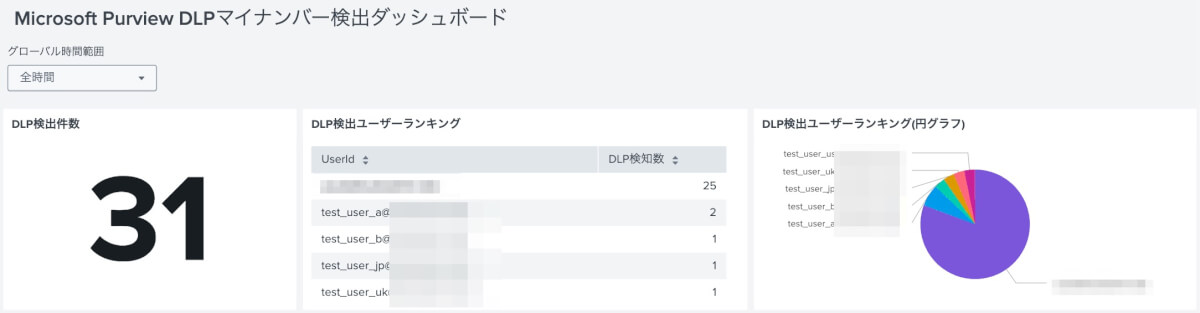
まず最初はDLPのアクティビティ全体を確認するパネルと時間のフィルターです。
グローバル時間範囲
インプットの時間範囲を入れて全体の時間をフィルターできるようにしています。過去24時間、過去7日間といった相対的な指定や、特定の日時を指定する絶対的な指定が可能です。
各パネルのクエリ内で・global_timeのトークンが参照されることで、表示内容が動的に切り替わります。クエリでは以下のように記述しています。
earliest="$global_time.earliest$" latest="$global_time.latest$"DLP検出件数
指定した期間内に発生したDLPポリシー違反の総数を示します。組織全体の傾向として、マイナンバーに関するアクティビティがどの程度発生しているかのボリューム感を把握するために使用します。
index="*" sourcetype="o365:management:activity" (Operation="DLPRuleMatch" OR Operation="DlpRuleMatch") earliest="$global_time.earliest$" latest="$global_time.latest$"
| stats count
DLP検出ユーザーランキング
マイナンバーの検出件数が多いユーザー上位10名をリストアップします。特定のユーザーによる過度な操作などを確認し、後続のユーザーにフォーカスした調査のターゲットを見つけます。
index="*" sourcetype="o365:management:activity" Operation="DLPRuleMatch" earliest="$global_time.earliest$" latest="$global_time.latest$"
| eval UserId = lower(UserId)
| stats count as "DLP検知数" by UserId
| sort - "DLP検知数"
| head 10
ついでに円グラフも並べて感覚で掴みやすいようにしています。
ユーザーフィルター
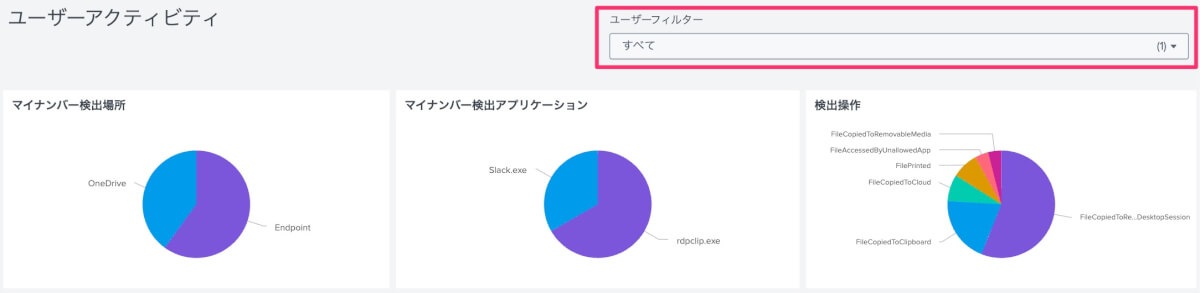
特定のユーザーに絞って状況を確認したい場合に使用する複数選択の入力項目です。一応複数選択にしています、1ユーザーから利用できるので。デフォルトでは「すべて(*)」が選択されています。クエリでは・filter_user_idのトークンを参照しています。以下のようにフィルターしていきます。
| search UserId IN ($filter_user_id$)以降のパネルはこのフィルターがかかった状態の表示になります。
マイナンバー検出場所
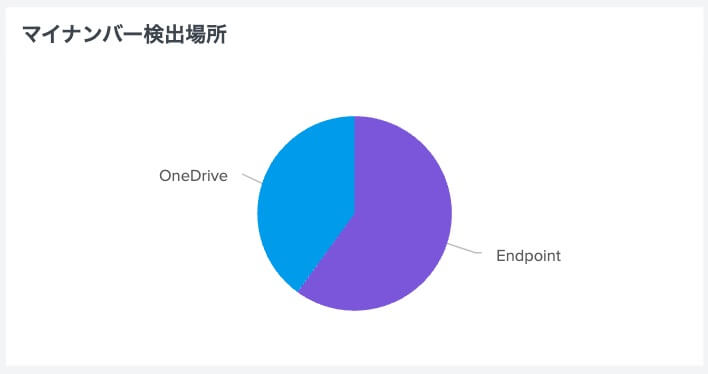
DLPで検出されたアクティビティが、SharePoint、OneDrive、Endpointなど、どのワークロード(Workload)で発生したかを分類しています。普段と違う操作場所が無いかなどを確認します。
index="*" sourcetype="o365:management:activity" (Operation="DLPRuleMatch" OR Operation="DlpRuleMatch") earliest="$global_time.earliest$" latest="$global_time.latest$"
| search "Japanese My Number Personal"
| search UserId IN ($filter_user_id$)
| stats count by Workload
| sort - count
マイナンバー検出アプリケーション
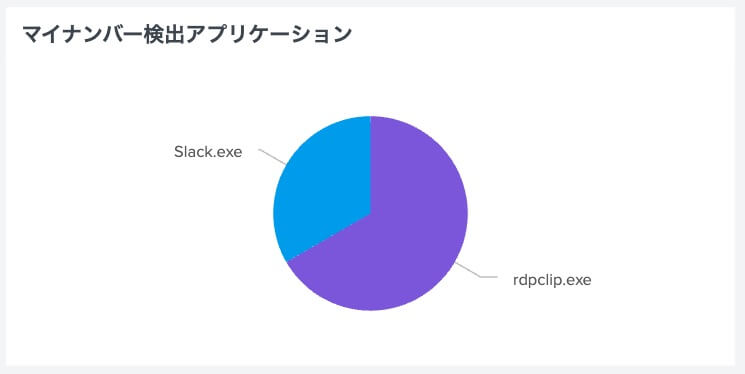
主にエンドポイントにおいて、どのアプリケーション経由でマイナンバーが扱われたかを可視化します。Webブラウザ、Excel、Teamsなどが分かるため、普段と違うアプリで扱っていないか確認できます。
index="*" sourcetype="o365:management:activity" (Operation="DLPRuleMatch" OR Operation="DlpRuleMatch") earliest="$global_time.earliest$" latest="$global_time.latest$"
Workload="Endpoint"
| search "Japanese My Number Personal"
| search UserId IN ($filter_user_id$)
| spath path="EndpointMetaData.Application" output=Application
| stats count by Application
| sort - count
検出操作
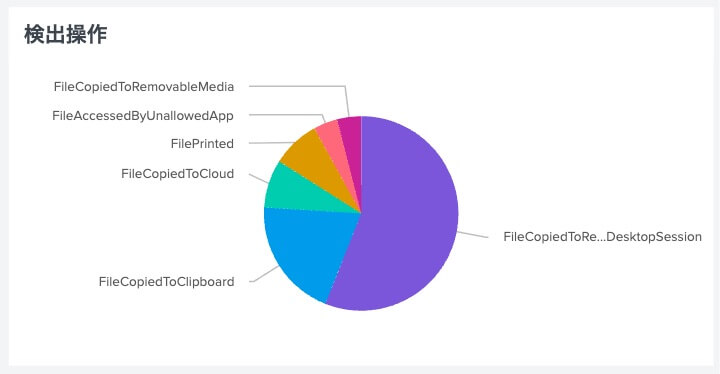
クリップボードへのコピー、印刷、USBストレージへの書き出しなど、エンドポイントで実行された具体的な操作内容を集計しています。特に印刷やUSBの利用などのアクティビティを確認できるので一番注目するポイントです。パット見で操作が分かりづらいので上手く変換できるとよりよいかも。
index="*" sourcetype="o365:management:activity" (Operation="DLPRuleMatch" OR Operation="DlpRuleMatch") earliest="$global_time.earliest$" latest="$global_time.latest$"
| spath path="EndpointMetaData.EndpointOperation" output=EndpointOperation
| search EndpointOperation="*"
| search UserId IN ($filter_user_id$)
| stats count by EndpointOperation
| sort - count
Geoマッピング
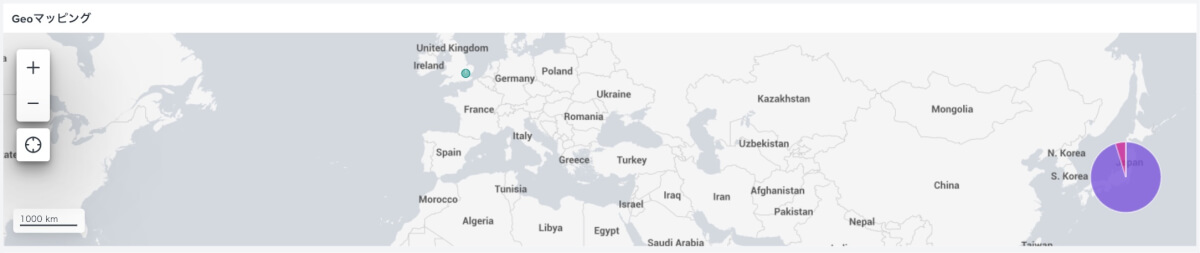
検出イベントが発生した送信元IPアドレスを地図上にプロットします。普通は日本国外での操作は考えられませんが、万が一起きた際に一発で分かります。
index="*" sourcetype="o365:management:activity" Operation="DLPRuleMatch" earliest="$global_time.earliest$" latest="$global_time.latest$"
| eval UserId = lower(UserId)
| search UserId IN ($filter_user_id$)
| iplocation ClientIP
| geostats count by ClientIP
DLP検出デバイスランキング

検出されたデバイス名とその利用ユーザーを一覧表示します。基本的には利用デバイスが限られる想定なので、普段と違うデバイスの利用がないか確認できます。
index="*" sourcetype="o365:management:activity" (Operation="DLPRuleMatch" OR Operation="DlpRuleMatch") earliest="$global_time.earliest$" latest="$global_time.latest$"
| spath path="EndpointMetaData.DeviceName" output=DeviceName
| search DeviceName="*"
| eval UserId = lower(UserId)
| search UserId IN ($filter_user_id$)
| stats count as "DLP検知数", values(UserId) as "利用ユーザー" by DeviceName
| sort - "DLP検知数"
| table DeviceName "利用ユーザー" "DLP検知数"
Severityカウント
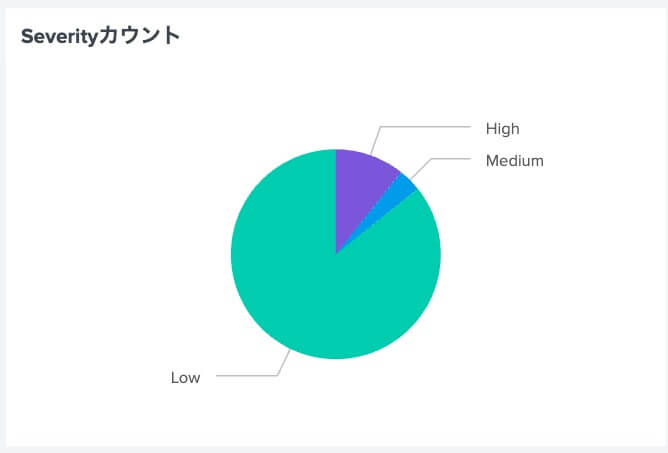
検出されたイベントを、High、Medium、Lowといった重要度(Severity)ごとに分類します。重要度の高い操作がどの程度含まれているかの比率を確認します。
index="*" sourcetype="o365:management:activity" Operation="DLPRuleMatch"earliest="$global_time.earliest$" latest="$global_time.latest$"
| eval UserId = lower(UserId)
| search UserId IN ($filter_user_id$)
| spath path="PolicyDetails{}.Rules{}.Severity" output=Severity
| mvexpand Severity
| where isnotnull(Severity) AND len(Severity) > 0
| stats count by Severity
| eval sort_order = case(Severity="High", 1, Severity="Medium", 2, Severity="Low", 3, true(), 4)
| sort sort_order
| fields - sort_order
Highのみリスト
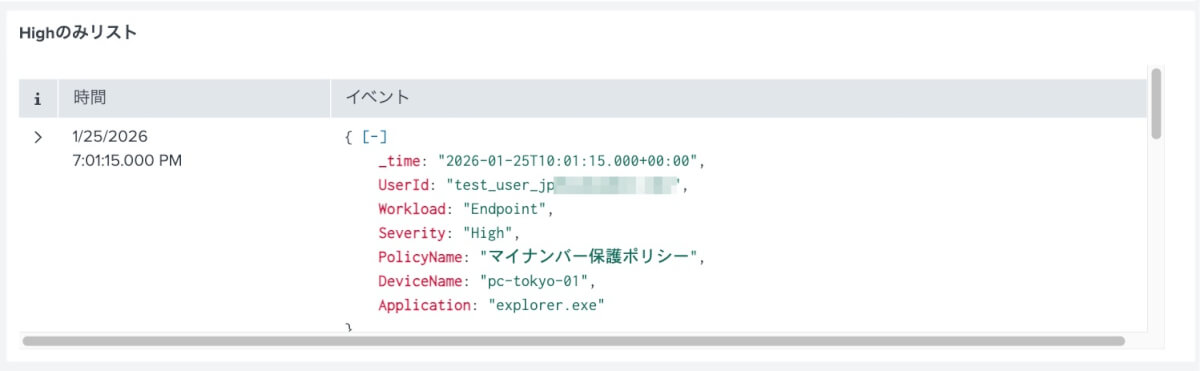
重要度がHighと判定された深刻なイベントのみを抽出して時系列で表示します。管理者が優先的に調査すべきログを絞り込んで確認するためのリストです。
index="*" sourcetype="o365:management:activity" Operation="DLPRuleMatch" earliest="$global_time.earliest$" latest="$global_time.latest$"
| eval UserId = lower(UserId)
| search UserId IN ($filter_user_id$)
| spath path="PolicyDetails{}.Rules{}.Severity" output=Severity
| search Severity="High"
| spath path="PolicyDetails{}.PolicyName" output=PolicyName
| spath path="EndpointMetaData.DeviceName" output=DeviceName
| spath path="EndpointMetaData.Application" output=Application
| table _time, UserId, Workload, Severity, PolicyName, DeviceName, Application
| sort - _time
DLP検出イベント一覧
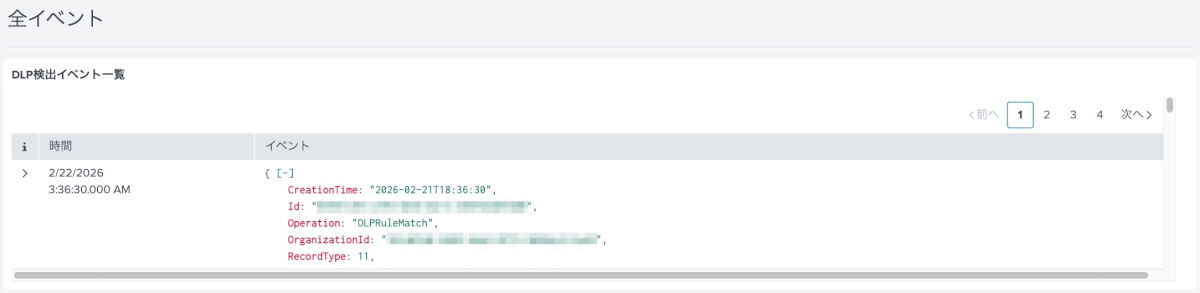
これはユーザーフィルターに関係なく全てのDLP検出イベントを表示します。軽くイベントを眺める際に利用しますが、詳細を見る場合にはそのままサーチ画面に飛んでいったほうがいいでしょう。
index="*" sourcetype="o365:management:activity" (Operation="DLPRuleMatch" OR Operation="DlpRuleMatch") earliest="$global_time.earliest$" latest="$global_time.latest$"以上ダッシュボードの説明でした。
まとめ
Microsoft PurviewのDLPでマイナンバー関連操作をトラッキングし、そのイベントをSplunkでダッシュボードを作って可視化してみました。
エクスポートデータと各クエリの解説を付けましたので、それぞれの現場での使い方に合わせて調整してみてください。