はじめに
こんにちは、俊介です!
今回は以前書いた「Box AI for HubsをTeamsから使えるように連携させてみた話」の続編的な位置づけです。
前回はLogic Apps + Teamsで連携させましたが、今回は Copilot Studioで作ったエージェントとBox AI for Hubs を連携させるので参考になれば嬉しいです!
今日のお話を簡単に
Copilot Studioで作ったエージェントから、Box Hubsに蓄積された社内ナレッジを検索・回答できるようにします。
Azure FunctionsでJWT認証 + Box AI APIの呼び出しを1本化し、Copilot StudioのHTTPアクションから呼び出す構成です。
本ブログを実施することで、Box Hubsのコンテンツに対して自然言語で質問でき、AIが回答してくれるエージェントが作れます。
どんなユーザー向け?
- Boxをメインでドキュメントやナレッジを管理している企業
- Box AI for Hubsを利用している、または利用できる企業
- Enterprise PlusプランまたはEnterprise Advancedプラン契約が必要です
- Copilot Studioでエージェントを作れる企業
構成図と全体フローの解説
今回実装するものを構成図にするとこんな感じです。

各ステップの役割はこうなっています。
| ステップ | 内容 |
|---|---|
| 1 | 従業員がCopilot Studioで作成したエージェントに質問を投げる |
| 2 | Copilot StudioがAzure FunctionsにHTTPリクエストを送信 |
| 3 | Azure FunctionsがBoxのアクセストークンを取得(JWT認証) Azure FunctionsがBox AI APIにクエリをPOST |
| 4 | Box AIがBox Hub内を検索 |
| 5 | Box Hub内の検索結果をBox AIに返す |
| 6 | Box HubのコンテンツをもとにAIが回答を生成してAzure Functionsに返す |
| 7 | Azure FunctionsがCopilot Studioに回答を返す |
| 8 | Copilot Studioが従業員に回答を返す |
なぜPower AutomateやLogic AppsではなくAzure Functionsを選択した理由
Power AutomateやLogic AppsはJWT署名(RS512アルゴリズム)をネイティブに処理できないため、Azure Functionsは必須の選択でした。実際に前回のTeams連携ブログでもLogic Apps単体では対応できず、Azure Functionsを組み合わせた経緯があります。
事前準備
準備するもの
- Box Hubs(検索対象のコンテンツが入っているもの)
- Box App(Server Authentication / JWT認証で作成済みのもの)
- Azure Functions
- Copilot Studioのエージェント(作成済み前提)
- VS Code(デプロイに使います)
- Python
Box側の準備について
Box Appの作成手順や関数コードのデプロイ手順は前回のブログと同じなのでそちらを参照してください!
注意事項は1つ、「Box AppのサービスアカウントをBox Hubに共有者として追加する」です。
Box Hubを開いて、作成したBox AppのサービスアカウントのメールアドレスをHubの共有者として追加してください。
これをやらないとAIがHubのコンテンツを参照できないので忘れずに!
Azure Functionsの実装
処理の流れ
① 環境変数からJWT秘密鍵を取得
② JWTアサーション生成 → Boxアクセストークン取得
③ Copilot Studioからpromptを受け取る
④ POST https://api.box.com/2.0/ai/ask でBox AIに質問
⑤ answerをCopilot Studioに返す
コード(function_app.py)
import os
import json
import logging
import jwt
import requests
import uuid
import time

import azure.functions as func

logging.basicConfig(level=logging.INFO)
logger = logging.getLogger(__name__)

app = func.FunctionApp(http_auth_level=func.AuthLevel.FUNCTION)


def get_box_access_token() -> str:
    """JWT認証でBoxアクセストークンを取得する(変更なし)"""
    client_id     = os.environ.get('BOX_CLIENT_ID')
    client_secret = os.environ.get('BOX_CLIENT_SECRET')
    private_key   = os.environ.get('BOX_PRIVATE_KEY', '').replace('\\n', '\n')
    public_key_id = os.environ.get('BOX_PUBLIC_KEY_ID')
    enterprise_id = os.environ.get('BOX_ENTERPRISE_ID')

    missing = [
        k for k, v in {
            'BOX_CLIENT_ID': client_id,
            'BOX_CLIENT_SECRET': client_secret,
            'BOX_PRIVATE_KEY': private_key,
            'BOX_PUBLIC_KEY_ID': public_key_id,
            'BOX_ENTERPRISE_ID': enterprise_id,
        }.items() if not v
    ]
    if missing:
        raise ValueError(f"Missing environment variables: {', '.join(missing)}")

    claims = {
        "iss": client_id,
        "sub": enterprise_id,
        "box_sub_type": "enterprise",
        "aud": "https://api.box.com/oauth2/token",
        "jti": uuid.uuid4().hex,
        "exp": int(time.time()) + 60,
    }
    jwt_token = jwt.encode(claims, private_key, algorithm="RS512", headers={"kid": public_key_id})

    resp = requests.post(
        "https://api.box.com/oauth2/token",
        data={
            "grant_type": "urn:ietf:params:oauth:grant-type:jwt-bearer",
            "assertion": jwt_token,
            "client_id": client_id,
            "client_secret": client_secret,
        },
    )
    resp.raise_for_status()
    token = resp.json().get("access_token")
    if not token:
        raise RuntimeError("access_token not found in Box token response")
    return token


@app.route(route="boxai_ask")
def boxai_ask(req: func.HttpRequest) -> func.HttpResponse:
    """
    Copilot Studio から呼び出されるエンドポイント。

    リクエストボディ(JSON):
        prompt           : str  - ユーザーの質問(必須)
        hub_id           : str  - Box Hub ID(省略時は環境変数 BOX_HUB_ID を使用)
        dialogue_history : list - 会話履歴(省略時は空リスト)

    レスポンス(JSON):
        answer           : str  - Box AIの回答
        citations        : list - 引用元リスト(include_citations=true の場合)
    """
    logger.info("boxai_ask function triggered.")

    # --- リクエストのパース ---
    try:
        body = req.get_json()
    except ValueError:
        return func.HttpResponse("Request body must be valid JSON.", status_code=400)

    prompt = body.get("prompt", "").strip()
    if not prompt:
        return func.HttpResponse("'prompt' is required.", status_code=400)

    logger.info(f"Received prompt: {prompt}")

    hub_id = body.get("hub_id") or os.environ.get("BOX_HUB_ID")
    if not hub_id:
        return func.HttpResponse(
            "'hub_id' is required (body or BOX_HUB_ID env var).", status_code=400
        )

    dialogue_history = body.get("dialogue_history") or []

    # --- Boxアクセストークン取得 ---
    try:
        access_token = get_box_access_token()
        logger.info("Box access token obtained.")
    except ValueError as e:
        logger.error(f"Config error: {e}")
        return func.HttpResponse(str(e), status_code=400)
    except requests.HTTPError as e:
        logger.error(f"Box token request failed: {e}")
        return func.HttpResponse(f"Failed to get Box token: {e}", status_code=502)
    except Exception as e:
        logger.error(f"Unexpected error getting token: {e}", exc_info=True)
        return func.HttpResponse(f"Internal error: {e}", status_code=500)

    # --- Box AI API 呼び出し ---
    ai_payload = {
        "mode": "single_item_qa",
        "prompt": prompt,
        "include_citations": True,
        "items": [{"type": "hubs", "id": hub_id}],
        "dialogue_history": dialogue_history,
    }

    try:
        ai_resp = requests.post(
            "https://api.box.com/2.0/ai/ask",
            headers={
                "Authorization": f"Bearer {access_token}",
                "Content-Type": "application/json",
            },
            json=ai_payload,
            timeout=30,
        )
        ai_resp.raise_for_status()
        ai_data = ai_resp.json()
        logger.info("Box AI response received.")
        logger.info(f"Citations: {json.dumps(ai_data.get('citations', []), ensure_ascii=False)}")
    except requests.HTTPError as e:
        logger.error(f"Box AI API error: {ai_resp.status_code} {ai_resp.text}")
        return func.HttpResponse(
            f"Box AI API error: {ai_resp.status_code} {ai_resp.text}", status_code=502
        )
    except requests.Timeout:
        logger.error("Box AI API request timed out.")
        return func.HttpResponse("Box AI API request timed out.", status_code=504)
    except Exception as e:
        logger.error(f"Unexpected error calling Box AI: {e}", exc_info=True)
        return func.HttpResponse(f"Internal error: {e}", status_code=500)

    # --- Copilot Studio へレスポンスを返す ---
    citations = ai_data.get("citations", [])
    # 重複を除いたファイル名一覧を作成
    file_names = list(dict.fromkeys(c.get("name", "") for c in citations if c.get("name")))
    citation_text = "\n\n📎 参照ファイル:" + "、".join(file_names) if file_names else ""

    result = {
        "answer": ai_data.get("answer", "") + citation_text,
        "citations": citations,
    }
    return func.HttpResponse(
        json.dumps(result, ensure_ascii=False),
        mimetype="application/json",
        status_code=200,
    )
requirements.txt
azure-functions
PyJWT
cryptography
requests
cryptography を忘れがちなので注意
これがないとデプロイ後にRS512署名でエラーになります。PyJWTが内部で使うライブラリなので、PyJWTだけ入れても動きません。
環境変数の設定
Azure Portalの [設定] > [環境変数] で以下を設定してください。
| 変数名 | 値 |
|---|---|
| BOX_CLIENT_ID | Box AppのクライアントID |
| BOX_CLIENT_SECRET | Box Appのクライアントシークレット |
| BOX_PRIVATE_KEY | 秘密鍵(改行を \n でエスケープ) |
| BOX_PUBLIC_KEY_ID | Box Appの公開鍵ID |
| BOX_ENTERPRISE_ID | Box EnterpriseのID |
| BOX_HUB_ID | 検索対象のBox Hub ID |
Copilot Studioのアクション設定
トピックの作成
- Copilot Studioを開いて「トピック」タブへ

- 「+トピックの追加」→「最初から」

- トピック名を入力(例:Box AIに質問する)

- 「トピックの機能を説明する」に以下を入力
例)
社内の手順書・マニュアル・ナレッジについて質問されたとき。
Box Hubsのコンテンツをもとに回答する。
HTTP要求アクションの追加
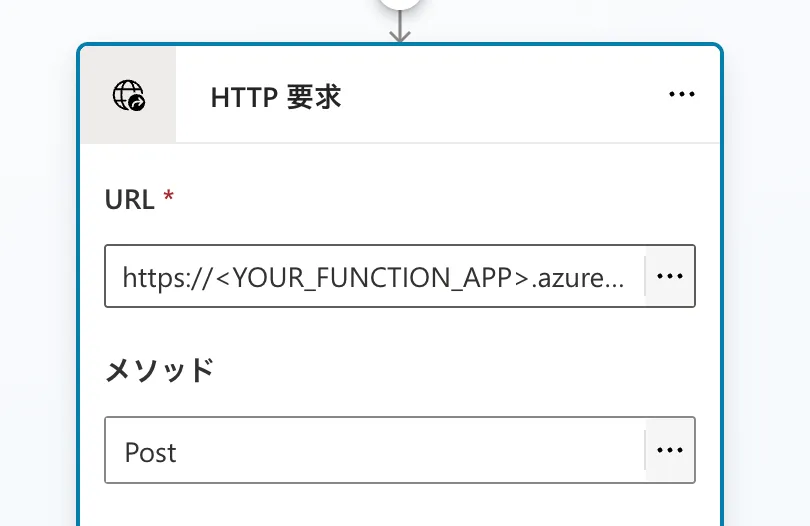
トピックの「+」→「詳細」→「HTTP 要求の送信」を選択します。
⚠️ 「ツールを追加する」からHTTPを検索すると他サービスのコネクタが大量に出てきます。純粋なHTTPリクエストは「詳細」の中にあります。

HTTP要求の設定
| 項目 | 値 |
|---|---|
| URL | https://<YOUR_FUNCTION_APP>.azurewebsites.net/api/boxai_ask?code=<KEY> |
| メソッド | POST |
| Content-Type(ヘッダー) | application/json |
※ヘッダーは「ヘッダーと本文」の「編集」を押して設定します。
本文の設定(ここが最大のハマりポイント)
本文を「JSONコンテンツ」に変更して、「JSON の編集」の横の ∨ から 「式」 モードに切り替えてください。
{
  dialogue_history: [],
  prompt: System.Activity.Text
}JSONモードではなく式モードを使う理由は後続のセクションで説明します。

応答の設定
- 「応答のデータタイプ」→「サンプルデータから」を選択

- 「サンプルJSONからスキーマを取得する」をクリックして以下を貼り付け
{
  "answer": "回答テキスト",
  "citations": [
    {
      "type": "file",
      "id": "1234567890",
      "name": "ファイル名.pdf",
      "content": "引用テキスト"
    }
  ]
}
- 「応答を名前付けて保存」→「新規作成」→ 変数名
BoxAIResponse(typeはrecordになります)
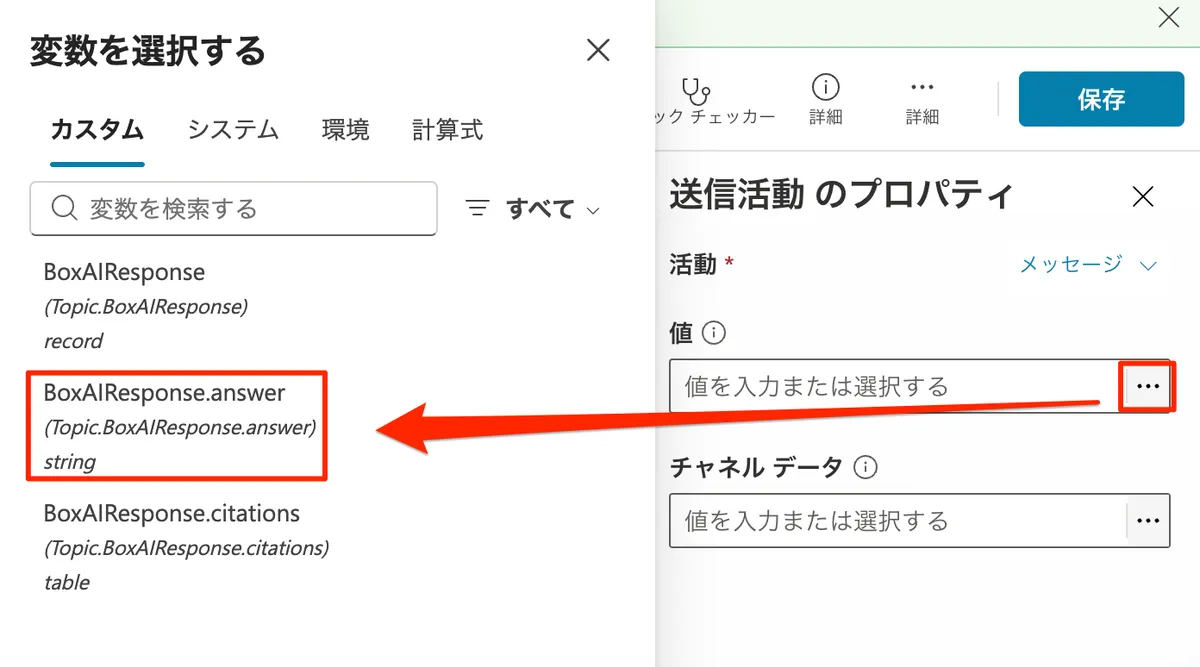
メッセージ送信の設定
HTTP要求ノードの下に「メッセージを送信する」を追加して、値のフィールドに「・・・」から BoxAIResponse.answer を選択してください。
①アクション追加

②データを設定
進めてて手こずった点
dialogue_history が null になる問題
現象: Copilot StudioのJSONエディタで [] を保存するとnullに変換される
原因: Copilot Studioの仕様で、空配列が保存時にnullに変換されてしまいます
解決策: Copilot Studio側は式モードで対応+Azure Functions側で or [] でフォールバック処理を追加で安心
# NG
dialogue_history = body.get("dialogue_history", [])

# OK:nullや未指定でも空配列にフォールバック
dialogue_history = body.get("dialogue_history") or []
Box AI APIは dialogue_history に null が来ると 400 Bad Request を返すので、必ずこの対処が必要です。(すでに前セクションで記載してるコードは追加済みです)動作確認
Copilot Studioのテスト画面で質問を投げてみます。

Box Hubsに入っているファイルの内容をもとに、ちゃんと回答が返ってくればOK
所感
- Copilot Studioの「式モード」はちょっとハマった
- dialogue_historyのnull問題はAIに聞いたらCopilot Studioあるあるっぽいので要注意らしい
- Azure FunctionsにBox AI APIの呼び出しまで一本化したことで、Copilot Studio側の設定がシンプルになった
さいごに
ここまで読んでくださってありがとうございました!
今回はCopilot StudioエージェントとBox AI for Hubsを、Azure Functionsを使って連携させてみました。
少しでも参考になれば嬉しいです!
次は会話履歴を活用した会話継続やKey Vault連携のセキュリティ強化もやってみたいと思います。
また書きます!!